- Home
- Help
- Your Library
- Introducing Smart Shuffle!
Help Wizard
Step 1
Type in your question below and we'll check to see what answers we can find...
Loading article...
Submitting...
If you couldn't find any answers in the previous step then we need to post your question in the community and wait for someone to respond. You'll be notified when that happens.
Simply add some detail to your question and refine the title if needed, choose the relevant category, then post.
Just quickly...
Before we can post your question we need you to quickly make an account (or sign in if you already have one).
Don't worry - it's quick and painless! Just click below, and once you're logged in we'll bring you right back here and post your question. We'll remember what you've already typed in so you won't have to do it again.
FAQs
Please see below the most popular frequently asked questions.
Loading article...
Loading faqs...
Ongoing Issues
Please see below the current ongoing issues which are under investigation.
Loading issue...
Loading ongoing issues...
Help categories
Account & Payment
Using Spotify
Listen Everywhere
Introducing Smart Shuffle!
Solved!

- Mark as New
- Bookmark
- Subscribe
- Mute
- Subscribe to RSS Feed
- Permalink
- Report Inappropriate Content
Introducing Smart Shuffle!
We know that our users love creating their own playlists to capture key moments in time – in fact, playlists created by users often become their most-streamed playlist for the first several months but listening to these playlists slowly fades overtime, and users are eager to discover new music.
With this in mind, we’re excited to launch a new play mode called Smart Shuffle that keeps listening sessions fresh and provides personalized recommendations that perfectly match any listeners’ playlist vibe.
This update will roll out to Premium users on mobile devices starting today.
How does Smart Shuffle work?
- You can use it in any playlist created by you, and your Liked Songs.
- To activate it, just use the Shuffle button to switch between regular play, Shuffle mode and Smart Shuffle.
- When Smart Shuffle is on, recommendations are added to your session automatically. You can find all the recommendations sitting in your queue.
- You will be able to recognize the music we are recommending with the sparkle (✨) symbol next to the track. For a playlist with more than 15 songs, we’ll recommend one song for every three tracks.
- And the best part, your original playlist remains untouched, so you can add any new track that catches your ear.
- If you like a specific recommendation, just save it using the plus button in the Now Playing View. If that song doesn’t hit right, just tap the minus to remove it from the recommendations. This is then used to better adjust the suggestions we put forward.
- Every time you turn Smart Shuffle off, a new mix will be available every time you activate it again.


Adding and removing recommendations.
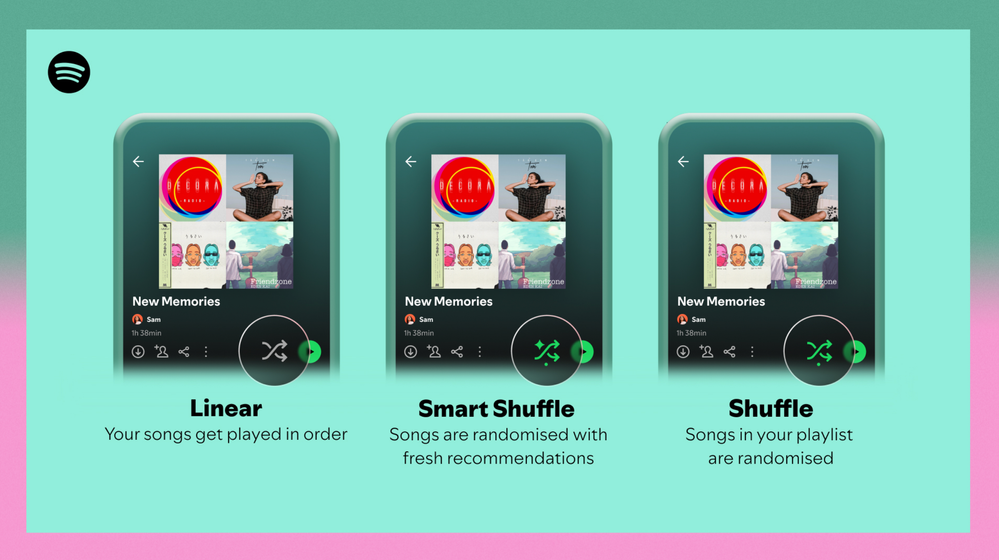
Different playback options.
FAQ
What about the Enhance feature?
For now, Smart Shuffle will replace the Enhance feature.
What will happen to Discover Weekly and other regularly updated playlists?
For the time being, no changes to those will be made. Smart Shuffle aims to improve the listening experience for user curated playlists.
Does this mean that using Smart Shuffle will cause my carefully curated playlists to get cluttered with new recommendations?
No! Your original playlist remains untouched, so you can add any new track that catches your ear. Smart Shuffle won’t change your playlist without your explicit permission. What changes instead is what you'll hear during each specific listening session
🌟 I would like to disable Smart Shuffle permanently. Can I do that?
Yes, you can! Just go to Settings and privacy and then to Playback and toggle the option Enable all play modes to off. This will mean you will only have the regular shuffle.
Note: This option is for Premium users only.
We hope you're as excited as we are about this new play mode. The official Newsroom announcement is out, you can check that out too. For any and all feedback on the matter you may have, you're more than welcome to comment in the thread below.
Solved! Go to Solution.
- Subscribe to RSS Feed
- Mark Topic as New
- Mark Topic as Read
- Float this Topic for Current User
- Bookmark
- Subscribe
- Printer Friendly Page

Hi there folks,
We're here to say that we've taken your feedback into account and you will now be able to disable Smart Shuffle from the app settings, as described in this now implemented idea!
The steps are as follows:
- Tap your profile picture at the top.
- Tap Settings and privacy.
- Select Playback.
- Switch Enable all play modes off.
This is for Premium users only and is only available on mobile at the moment, but rest assured it will be coming to desktop in due time as well.
Cheers!

- Mark as New
- Bookmark
- Subscribe
- Mute
- Subscribe to RSS Feed
- Permalink
- Report Inappropriate Content
Make it go away ! Complete **bleep** !

- Mark as New
- Bookmark
- Subscribe
- Mute
- Subscribe to RSS Feed
- Permalink
- Report Inappropriate Content
Unfortunately, this is back and ruining the regular shuffle button again. Shuffling should be a one-tap experience, and it should be an on-off cycle instead of the unshuffled-shuffled-*delay*“smart” shuffled cycle. The idea is great, but it needs to be separate from the shuffle button or able to toggle off,

- Mark as New
- Bookmark
- Subscribe
- Mute
- Subscribe to RSS Feed
- Permalink
- Report Inappropriate Content
Heavily considering switching to a different platform because of this feature. When it was first trialed last year I was not a fan and provided feedback. None of the commenters on that thread were keen about this either. I hated it last year. I hate it now. It’s not a feature, it’s an incovenience. Whoever reported that the trial last year on this was positive was obviously full of it. Im yet to come across a comment stating how they love it and it elevated spotify. Give us the option to disable it altogether. The app can barely handle turning it off after it’s defaulted to turn on whenever we try to shuffle.

- Mark as New
- Bookmark
- Subscribe
- Mute
- Subscribe to RSS Feed
- Permalink
- Report Inappropriate Content
Don't sweat it, Spotify, you don't have to reinvent the wheel to impress, just make a shuffle button... shuffle without being 3 things at the same time

- Mark as New
- Bookmark
- Subscribe
- Mute
- Subscribe to RSS Feed
- Permalink
- Report Inappropriate Content
The smart shuffle is a very good feature. I like it a lot more than enhance. I just hope it gets its own button. Also, I think enhance should stay as an alternative for those people who prefer it to smart shuffle. Also give enhance its own button.
To me though, smart shuffle is perfect. Just move it from the shuffle button to its own button.

- Mark as New
- Bookmark
- Subscribe
- Mute
- Subscribe to RSS Feed
- Permalink
- Report Inappropriate Content
I have Smart Shuffle and the "+" on iOS, while on macOS I have Enhance and the heart button. Absolute clown show UX. Spotify has like 9,000 employees, how are these changes actually made in production?
- Mark as New
- Bookmark
- Subscribe
- Mute
- Subscribe to RSS Feed
- Permalink
- Report Inappropriate Content
This feature sucks, its inconsistent in when it works when it doesnt. Enhance much much better. Spotify slowly getting worse with this bad update and new horrible lay out is if its tiktok. Cant even disable, like i dont want smart shuffle, i dont want to see event when i just wanna look at the lyrics. Stop making changed you cant turn on. Sincere

- Mark as New
- Bookmark
- Subscribe
- Mute
- Subscribe to RSS Feed
- Permalink
- Report Inappropriate Content
Please let us PERMANENTLY disable this. I made the playlist the way I made it, let me listen to it that way.
- Mark as New
- Bookmark
- Subscribe
- Mute
- Subscribe to RSS Feed
- Permalink
- Report Inappropriate Content
Please allow option to permanently disable Smart Shuffle. Not all users find it useful. I don't pay for Premium just to have music I don't want to listen to "advertised" at me. Thank you!

- Mark as New
- Bookmark
- Subscribe
- Mute
- Subscribe to RSS Feed
- Permalink
- Report Inappropriate Content
When I have no internet, I want to turn shuffle off and then it auto turns in smart shuffle (or tries to) my spotify app literally bricks and I have to restart my phone.
Like many have said, WE MADE PLAYLISTS THE WAY WE WANT.
PLEASE GIVE US A WAY TO TURN THIS BUG (sorry) "FEATURE" OFF.
- Mark as New
- Bookmark
- Subscribe
- Mute
- Subscribe to RSS Feed
- Permalink
- Report Inappropriate Content
Created a profile just to say that I hate Smart Shuffle.

- Mark as New
- Bookmark
- Subscribe
- Mute
- Subscribe to RSS Feed
- Permalink
- Report Inappropriate Content
Please have a way to disable this. I have to press shuffle twice and wait for a leg just to turn of regular shuffling.

- Mark as New
- Bookmark
- Subscribe
- Mute
- Subscribe to RSS Feed
- Permalink
- Report Inappropriate Content
Please let us disable smart shuffle.
Forcing us to cycle through "smart shuffle" literally kills use-cases for classic shuffle.
For example, I tend to shuffling a long playlist to find a random starting point, then turning shuffle off to play from that point. When we have to cycle through "smart shuffle" playback always starts from the same song.
I use trick this for large playlists that are ordered chronologically (e.g. "Liked"). It lets me rediscover old songs that I would never get to if I played it linearly, but also lets me dive into and relive periods of my past.
Similarly it's a way to enhances the replayability of any other larger playlist (100s or 1000s of songs).
Simply jumping around randomly with shuffle is a waste of carefully curated playlists (especially where intros and skits are included), as each track loses context completely. Introducing a random starting point means you don't completely lose the context, while also not having to start from the same place each time.

- Mark as New
- Bookmark
- Subscribe
- Mute
- Subscribe to RSS Feed
- Permalink
- Report Inappropriate Content
Please bring back "Enhance" and remove smart shuffle or give it an option to disable it completely.
Even switched on, I don't see the files smart shuffle added to my lists?!
Enhance was much better!
- Mark as New
- Bookmark
- Subscribe
- Mute
- Subscribe to RSS Feed
- Permalink
- Report Inappropriate Content
Spotify, I still have this irritating option available... please do something with it. My patience is running low.
- Mark as New
- Bookmark
- Subscribe
- Mute
- Subscribe to RSS Feed
- Permalink
- Report Inappropriate Content
Horrible feature. There are lot's of ways to explore your suggestions already (which are usually not even great suggestions anyway) without you breaking the shuffle button.

- Mark as New
- Bookmark
- Subscribe
- Mute
- Subscribe to RSS Feed
- Permalink
- Report Inappropriate Content
The new smart shuffle need to be improved. While the suggestions are good every time a playlist is paused, it starts playing the same songs it had already played an hour ago, from playlist of smart shuffle. It really is not good. Specially when there are 100 other songs in the playlist that it can choose to go to. It seems the order is already predefined, somehow.
- Mark as New
- Bookmark
- Subscribe
- Mute
- Subscribe to RSS Feed
- Permalink
- Report Inappropriate Content
i will be switching to another music provider if you do not remove this disaster of a feature. i am NOT paying for your service just for you to tell me what i should be listening to.
- Mark as New
- Bookmark
- Subscribe
- Mute
- Subscribe to RSS Feed
- Permalink
- Report Inappropriate Content
So happy I ditched Spotify
- Mark as New
- Bookmark
- Subscribe
- Mute
- Subscribe to RSS Feed
- Permalink
- Report Inappropriate Content
I've liked and are mostly filled in with other stuff I listen to, in a
cohesive theme even. Of course they're completely buried where I rarely
see them. I've come to believe Spotify does not apprehend that the most
important aspect of their app is a functioning music player, not a sales
platform.

Suggested posts

Hey there you, Yeah, you! 😁 Welcome - we're glad you joined the Spotify Community! While you here, let's have a fun game and get…