- Home
- Help
- Your Library
- Introducing Smart Shuffle!
Help Wizard
Step 1
Type in your question below and we'll check to see what answers we can find...
Loading article...
Submitting...
If you couldn't find any answers in the previous step then we need to post your question in the community and wait for someone to respond. You'll be notified when that happens.
Simply add some detail to your question and refine the title if needed, choose the relevant category, then post.
Just quickly...
Before we can post your question we need you to quickly make an account (or sign in if you already have one).
Don't worry - it's quick and painless! Just click below, and once you're logged in we'll bring you right back here and post your question. We'll remember what you've already typed in so you won't have to do it again.
FAQs
Please see below the most popular frequently asked questions.
Loading article...
Loading faqs...
Ongoing Issues
Please see below the current ongoing issues which are under investigation.
Loading issue...
Loading ongoing issues...
Help categories
Account & Payment
Using Spotify
Listen Everywhere
Introducing Smart Shuffle!
Solved!

- Mark as New
- Bookmark
- Subscribe
- Mute
- Subscribe to RSS Feed
- Permalink
- Report Inappropriate Content
Introducing Smart Shuffle!
We know that our users love creating their own playlists to capture key moments in time – in fact, playlists created by users often become their most-streamed playlist for the first several months but listening to these playlists slowly fades overtime, and users are eager to discover new music.
With this in mind, we’re excited to launch a new play mode called Smart Shuffle that keeps listening sessions fresh and provides personalized recommendations that perfectly match any listeners’ playlist vibe.
This update will roll out to Premium users on mobile devices starting today.
How does Smart Shuffle work?
- You can use it in any playlist created by you, and your Liked Songs.
- To activate it, just use the Shuffle button to switch between regular play, Shuffle mode and Smart Shuffle.
- When Smart Shuffle is on, recommendations are added to your session automatically. You can find all the recommendations sitting in your queue.
- You will be able to recognize the music we are recommending with the sparkle (✨) symbol next to the track. For a playlist with more than 15 songs, we’ll recommend one song for every three tracks.
- And the best part, your original playlist remains untouched, so you can add any new track that catches your ear.
- If you like a specific recommendation, just save it using the plus button in the Now Playing View. If that song doesn’t hit right, just tap the minus to remove it from the recommendations. This is then used to better adjust the suggestions we put forward.
- Every time you turn Smart Shuffle off, a new mix will be available every time you activate it again.


Adding and removing recommendations.
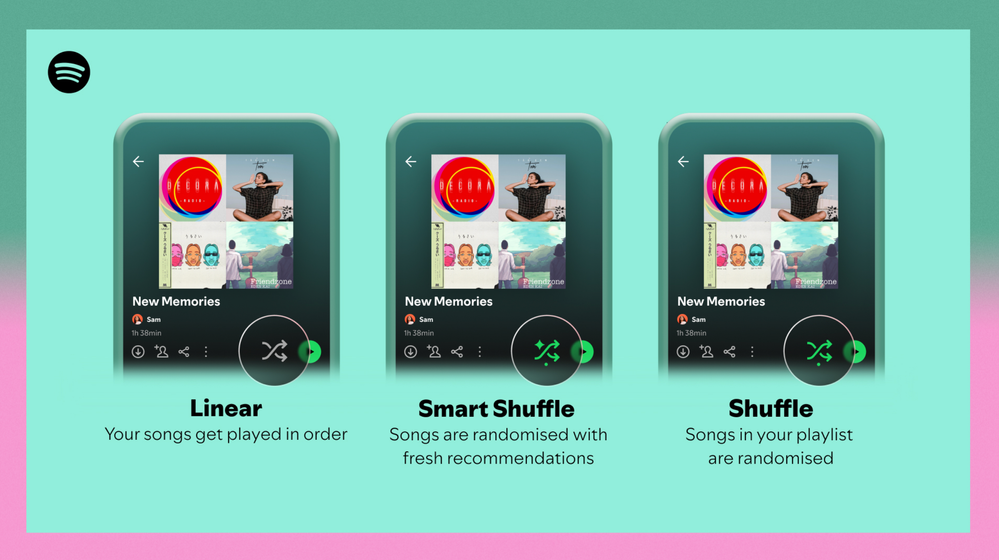
Different playback options.
FAQ
What about the Enhance feature?
For now, Smart Shuffle will replace the Enhance feature.
What will happen to Discover Weekly and other regularly updated playlists?
For the time being, no changes to those will be made. Smart Shuffle aims to improve the listening experience for user curated playlists.
Does this mean that using Smart Shuffle will cause my carefully curated playlists to get cluttered with new recommendations?
No! Your original playlist remains untouched, so you can add any new track that catches your ear. Smart Shuffle won’t change your playlist without your explicit permission. What changes instead is what you'll hear during each specific listening session
🌟 I would like to disable Smart Shuffle permanently. Can I do that?
Yes, you can! Just go to Settings and privacy and then to Playback and toggle the option Enable all play modes to off. This will mean you will only have the regular shuffle.
Note: This option is for Premium users only.
We hope you're as excited as we are about this new play mode. The official Newsroom announcement is out, you can check that out too. For any and all feedback on the matter you may have, you're more than welcome to comment in the thread below.
Solved! Go to Solution.
- Subscribe to RSS Feed
- Mark Topic as New
- Mark Topic as Read
- Float this Topic for Current User
- Bookmark
- Subscribe
- Printer Friendly Page

Hi there folks,
We're here to say that we've taken your feedback into account and you will now be able to disable Smart Shuffle from the app settings, as described in this now implemented idea!
The steps are as follows:
- Tap your profile picture at the top.
- Tap Settings and privacy.
- Select Playback.
- Switch Enable all play modes off.
This is for Premium users only and is only available on mobile at the moment, but rest assured it will be coming to desktop in due time as well.
Cheers!

- Mark as New
- Bookmark
- Subscribe
- Mute
- Subscribe to RSS Feed
- Permalink
- Report Inappropriate Content
Easily the worst Spotify feature to date.

- Mark as New
- Bookmark
- Subscribe
- Mute
- Subscribe to RSS Feed
- Permalink
- Report Inappropriate Content
Just delete this garbage fkn **bleep** what is this laggy unnecessary feature switched to Apple Music for now

- Mark as New
- Bookmark
- Subscribe
- Mute
- Subscribe to RSS Feed
- Permalink
- Report Inappropriate Content
+1 on the experimentation on the Free User profiles. I pay to listen to what I want, when I want, in the order that I want - this should afford me the opportunity to opt out of a feature that I don't like or want to use.
- Mark as New
- Bookmark
- Subscribe
- Mute
- Subscribe to RSS Feed
- Permalink
- Report Inappropriate Content
Question for the Spotify devs - what is the point of having this option (turned OFF, BTW):

If it is going to be ignored?

- Mark as New
- Bookmark
- Subscribe
- Mute
- Subscribe to RSS Feed
- Permalink
- Report Inappropriate Content
**bleep** your smart shuffle, I want it disabled by default and not have to click every single time, it makes me not want to use Spotify when you force a new feature upon me like this.

- Mark as New
- Bookmark
- Subscribe
- Mute
- Subscribe to RSS Feed
- Permalink
- Report Inappropriate Content
Correct press release:
“It is now MANDATORY for all users of Spotify, premium or free, to use the smart shuffle function ONCE for every normal shuffle!“

- Mark as New
- Bookmark
- Subscribe
- Mute
- Subscribe to RSS Feed
- Permalink
- Report Inappropriate Content
Hope the **bleep** that decided to implement this is well pleased with himself

- Mark as New
- Bookmark
- Subscribe
- Mute
- Subscribe to RSS Feed
- Permalink
- Report Inappropriate Content
I couldn't stand this feature and moved back to Apple Music. It was a good run with Spotify's lower pricing while it lasted. Now that they matched Apple Music, there was no way I would pay the same price for a lower quality and lack of response.
It's good to enjoy lossless and Hi-Res music quality with Apple Music once again. I get back my direct HomePod support. Listen to music in Dolby Atmos (a slightly different experience from the usual stereo music). And have Apple Sing feature for that corny Karaoke experience. lol.
- Mark as New
- Bookmark
- Subscribe
- Mute
- Subscribe to RSS Feed
- Permalink
- Report Inappropriate Content
@oneframe that apple sing thing sounds quite good. Going to hold out for one more payment period hoping they change it before moving over
- Mark as New
- Bookmark
- Subscribe
- Mute
- Subscribe to RSS Feed
- Permalink
- Report Inappropriate Content
@pallas84, I agree. I had one more month of the same price hoping they would hear us out. But since I'm in the Apple eco-system, I just decided to do it now or never.
Mind you, the change back to a different interface can be jarring. Not to mention recreating the playlists I had with Spotify.
Both of these might be a turn off, so I would recommend seeking a free trial first for anyone wanting to change. I can only assume people having stayed with Spotify for the longest time will not have an easy time. And that's what Spotify (or even Apple Music) is banking on. So I only recommend a change if the above features truly make a difference for you.

- Mark as New
- Bookmark
- Subscribe
- Mute
- Subscribe to RSS Feed
- Permalink
- Report Inappropriate Content
Voicing my displeasure on this feature as well. Every time I want to go from shuffle back to playing my music in order I have to wait for over a second for it to generate smart shuffle suggestions. This operation should be near instant and is really starting to bother me.
Some suggestions:
- Make smart shuffle an async operation (add items to the queue behind the scenes, so if I switch back to in-order listening the smart shuffle API call can be cancelled)
- Add an option to disable smart shuffle
- Remove this feature completely
Please fix this ASAP, it's existed in this state for far too long and I get increasingly annoyed with each smart shuffle cycle. Fixing this should be priority #1 at Spotify right now.
- Mark as New
- Bookmark
- Subscribe
- Mute
- Subscribe to RSS Feed
- Permalink
- Report Inappropriate Content
I received this monstrosity of a feature over four months ago and you guys have yet to fix the bug where you can’t disable the smart shuffle feature. It still reloads the smart shuffle recommendation instead of disabling smart shuffle.
Bring back the enhance button, that way users that like the additional songs can have them while users like me can listen to what we want!
- Mark as New
- Bookmark
- Subscribe
- Mute
- Subscribe to RSS Feed
- Permalink
- Report Inappropriate Content
I switched to Apple music using an app called „Songshift“. It transfers your playlists so you have no effort to recreate them.
Then the first six weeks, I transferred every weekly „Discover weekly“ and „Release Radar“ to speed up the Apple algorithm training.
I am very happy with it, the lossless sound quality is so much better.

- Mark as New
- Bookmark
- Subscribe
- Mute
- Subscribe to RSS Feed
- Permalink
- Report Inappropriate Content
Incredible. 34 pages of clients complaining about a feature that is hurting the user base, and still Spotify takes no action. Is this the kind of company you want to give your money to?

- Mark as New
- Bookmark
- Subscribe
- Mute
- Subscribe to RSS Feed
- Permalink
- Report Inappropriate Content
I'm astonished there have been so many replies to this. Just give us an off switch. My God. Looking for alts at this point as well. I own a sizeable chunk of the music I listen to on your app. Looks like I get to start another home server project! 🙂
- Mark as New
- Bookmark
- Subscribe
- Mute
- Subscribe to RSS Feed
- Permalink
- Report Inappropriate Content
The enhanced feature was much better, switch it back.

- Mark as New
- Bookmark
- Subscribe
- Mute
- Subscribe to RSS Feed
- Permalink
- Report Inappropriate Content
It's been so long. No response! Are we all just yelling into the void? =(
I'd really just want to have the Enhance button back on mobile, and the option to disable Smart Shuffle completely. It makes the user experience abysmal. It seems like Spotify is intentionally alienating its userbase. Please do better! =(((
I will cry. I will move to another streaming service as soon as my subscription is over if this isn't fixed. I've heard YouTube Music isn't that bad.
- Mark as New
- Bookmark
- Subscribe
- Mute
- Subscribe to RSS Feed
- Permalink
- Report Inappropriate Content
Come on, add an option to remove this, I heavily dislike this Smart shuffle and everytime I turn it on on accident it takes almost 4 seconds to return to normal shuffle. This is AWFUL.
The feature is nice for some people, sure but it should be OPTIONAL and I should be able to remove it in Options Menu, you can't just add stuff and wreck functionalities for people that don't like them.

- Mark as New
- Bookmark
- Subscribe
- Mute
- Subscribe to RSS Feed
- Permalink
- Report Inappropriate Content
hey! this is the worst! give me the option to get rid of it!

- Mark as New
- Bookmark
- Subscribe
- Mute
- Subscribe to RSS Feed
- Permalink
- Report Inappropriate Content
I’ve officially switched over to Youtube Music from Spotify. You guys did it, you lost a paying customer of over 8 years. For anyone who has a lot of music saved on spotify and doesn’t want to go through the pain of manually switching over to another streaming platform, use Soundiiz.com and it will literally do it for you.
I hope Spotify fades into obscurity. What an absolute joke of a platform lol

Suggested posts

Hey there you, Yeah, you! 😁 Welcome - we're glad you joined the Spotify Community! While you here, let's have a fun game and get…