- Home
- Help
- Your Library
- Introducing Smart Shuffle!
Help Wizard
Step 1
Type in your question below and we'll check to see what answers we can find...
Loading article...
Submitting...
If you couldn't find any answers in the previous step then we need to post your question in the community and wait for someone to respond. You'll be notified when that happens.
Simply add some detail to your question and refine the title if needed, choose the relevant category, then post.
Just quickly...
Before we can post your question we need you to quickly make an account (or sign in if you already have one).
Don't worry - it's quick and painless! Just click below, and once you're logged in we'll bring you right back here and post your question. We'll remember what you've already typed in so you won't have to do it again.
FAQs
Please see below the most popular frequently asked questions.
Loading article...
Loading faqs...
Ongoing Issues
Please see below the current ongoing issues which are under investigation.
Loading issue...
Loading ongoing issues...
Help categories
Account & Payment
Using Spotify
Listen Everywhere
Introducing Smart Shuffle!
Solved!

- Mark as New
- Bookmark
- Subscribe
- Mute
- Subscribe to RSS Feed
- Permalink
- Report Inappropriate Content
Introducing Smart Shuffle!
We know that our users love creating their own playlists to capture key moments in time – in fact, playlists created by users often become their most-streamed playlist for the first several months but listening to these playlists slowly fades overtime, and users are eager to discover new music.
With this in mind, we’re excited to launch a new play mode called Smart Shuffle that keeps listening sessions fresh and provides personalized recommendations that perfectly match any listeners’ playlist vibe.
This update will roll out to Premium users on mobile devices starting today.
How does Smart Shuffle work?
- You can use it in any playlist created by you, and your Liked Songs.
- To activate it, just use the Shuffle button to switch between regular play, Shuffle mode and Smart Shuffle.
- When Smart Shuffle is on, recommendations are added to your session automatically. You can find all the recommendations sitting in your queue.
- You will be able to recognize the music we are recommending with the sparkle (✨) symbol next to the track. For a playlist with more than 15 songs, we’ll recommend one song for every three tracks.
- And the best part, your original playlist remains untouched, so you can add any new track that catches your ear.
- If you like a specific recommendation, just save it using the plus button in the Now Playing View. If that song doesn’t hit right, just tap the minus to remove it from the recommendations. This is then used to better adjust the suggestions we put forward.
- Every time you turn Smart Shuffle off, a new mix will be available every time you activate it again.


Adding and removing recommendations.
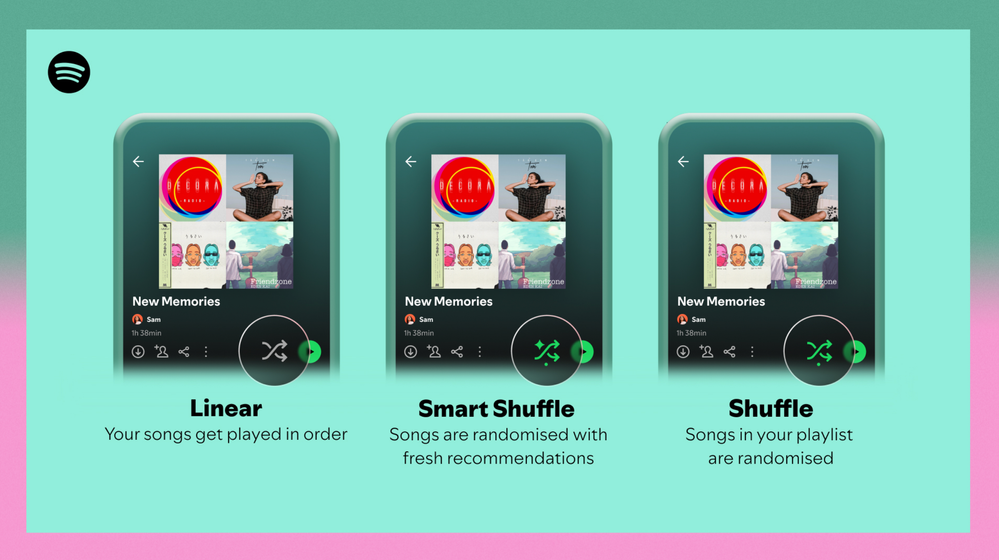
Different playback options.
FAQ
What about the Enhance feature?
For now, Smart Shuffle will replace the Enhance feature.
What will happen to Discover Weekly and other regularly updated playlists?
For the time being, no changes to those will be made. Smart Shuffle aims to improve the listening experience for user curated playlists.
Does this mean that using Smart Shuffle will cause my carefully curated playlists to get cluttered with new recommendations?
No! Your original playlist remains untouched, so you can add any new track that catches your ear. Smart Shuffle won’t change your playlist without your explicit permission. What changes instead is what you'll hear during each specific listening session
🌟 I would like to disable Smart Shuffle permanently. Can I do that?
Yes, you can! Just go to Settings and privacy and then to Playback and toggle the option Enable all play modes to off. This will mean you will only have the regular shuffle.
Note: This option is for Premium users only.
We hope you're as excited as we are about this new play mode. The official Newsroom announcement is out, you can check that out too. For any and all feedback on the matter you may have, you're more than welcome to comment in the thread below.
Solved! Go to Solution.
- Subscribe to RSS Feed
- Mark Topic as New
- Mark Topic as Read
- Float this Topic for Current User
- Bookmark
- Subscribe
- Printer Friendly Page

Hi there folks,
We're here to say that we've taken your feedback into account and you will now be able to disable Smart Shuffle from the app settings, as described in this now implemented idea!
The steps are as follows:
- Tap your profile picture at the top.
- Tap Settings and privacy.
- Select Playback.
- Switch Enable all play modes off.
This is for Premium users only and is only available on mobile at the moment, but rest assured it will be coming to desktop in due time as well.
Cheers!

- Mark as New
- Bookmark
- Subscribe
- Mute
- Subscribe to RSS Feed
- Permalink
- Report Inappropriate Content
Back to make my 4th complaint over the course of the many months you've been "testing" this feature. Guess what: the test failed, hard. And then you increase the price of premium. What a joke.

- Mark as New
- Bookmark
- Subscribe
- Mute
- Subscribe to RSS Feed
- Permalink
- Report Inappropriate Content
Great idea @Joan but poor implementation. I don't want you to automatically add music to my favorites or other playlists. You already have a setting for 'AutoPlay' to play suggested music which I have disabled. If you want to put a second tick box for smart playlists - sure. But please stop making me listen to music I haven't picked with no 'opt out' option.

- Mark as New
- Bookmark
- Subscribe
- Mute
- Subscribe to RSS Feed
- Permalink
- Report Inappropriate Content
Just allow us to disable smart shuffle. It loads for so long when I'm just trying to switch between shuffle and ordered play. Its a huge pain.

- Mark as New
- Bookmark
- Subscribe
- Mute
- Subscribe to RSS Feed
- Permalink
- Report Inappropriate Content
Tip that worked for me: if you sign out and sign back in the smart shuffle option no longer shows up in the rotation.
Found out about it through this post.

- Mark as New
- Bookmark
- Subscribe
- Mute
- Subscribe to RSS Feed
- Permalink
- Report Inappropriate Content
No one wanted this Joan tell your bosses this **bleep** didn’t work.
- Mark as New
- Bookmark
- Subscribe
- Mute
- Subscribe to RSS Feed
- Permalink
- Report Inappropriate Content
i don’t have as much of a headache anymore after switching from spotify after using it for the past 8 years. use Soundiiz.com to transfer your playlists over to another service if you have a longer playlist or 2 like i do. spotify is dead in the water & i’d like to speed that up by getting more people to stop giving these baboons money like i did. no more money from me because of stupid decisions, cry about it spotify. i hope you get laid off because of it, Joan.

- Mark as New
- Bookmark
- Subscribe
- Mute
- Subscribe to RSS Feed
- Permalink
- Report Inappropriate Content
Thank you @sspenst (and the original poster that I found @CCBW), signing out and back in did completely get rid of smart shuffle in the on/off shuffle rotation for me!
Everyone, sign out then sign back in to see if that gets rid of smart shuffle for you! If smart shuffle is gone for you, disable app updates for Spotify on your device so that if they try to force smart shuffle on you again it won't update and add it back! Even the annoying messages (the ones that lets you know EVERY time you unshuffle that you must be online to use smart shuffle, that covered up the shuffle button in the queue-view, and still caused a wait when in off-line mode) are also gone for me when trying to quickly unshuffle and reshuffle to add songs to my curated queue! Thank goodness there are no traces of smart shuffle left!
I really hope this is us seeing an early iteration of Spotify getting rid of smart shuffle, but I don't have nearly enough hope to ever willingly update Spotify again. I was one of the many unlucky ones that had smart shuffle forced upon me early as an unwilling tester for it. After I, and a lot of other Spotify community members, vehemently complained about it, I thought it was gone for good when they removed it the first time, but when they brought it back (and for everyone this time) Spotify lost all of my trust. Community members: try this method for disabling smart shuffle before it is too late!

- Mark as New
- Bookmark
- Subscribe
- Mute
- Subscribe to RSS Feed
- Permalink
- Report Inappropriate Content
The tip some have been sharing of signing out then back in has worked for me. Also, it brings the Enhance option back.
Thanks to the community for telling us!! 😃

- Mark as New
- Bookmark
- Subscribe
- Mute
- Subscribe to RSS Feed
- Permalink
- Report Inappropriate Content
Thanks for sharing the workaround about logging out and back in. That actually also helped me with another weird behaviour of the smart shuffle for me. When listening to music on my Alexa and toggling shuffle (even on PC), smart shuffle would activate, and the icon for the shuffle would not update quick enough in my desktop app (not sure about my phone). Now that works fine too 🙂
If it ever does comes back, I might consider going through the hassle of trying to unofficially patch the app to get rid of it. I have been a mostly happy Spotify Premium customer for 5 years, been listening to Spotify prior to purchasing Premium for a few years with ads, and can also appreciate Spotify's amazing developer experience for their APIs as well as their awesome contributions to open-source. I haven't had much headaches as a user over the years and it has improved my music listening experience a lot. I believe that Spotify is usually doing a great job of satisfying the community. Surely we have lost some great features in the past, but they never affected the core listening experience the way the smart-shuffle does, so I have hope they'll listen to the community on this one.

- Mark as New
- Bookmark
- Subscribe
- Mute
- Subscribe to RSS Feed
- Permalink
- Report Inappropriate Content
How do I disable this?

- Mark as New
- Bookmark
- Subscribe
- Mute
- Subscribe to RSS Feed
- Permalink
- Report Inappropriate Content
please add a way to disable smart shuffle. the song recommendations are never good to begin with

- Mark as New
- Bookmark
- Subscribe
- Mute
- Subscribe to RSS Feed
- Permalink
- Report Inappropriate Content
Unfortunately the workaround to make it disappear only works when we don't close the app, once you close it and comes back smart shuffle also comes back to haunt you (at least it happened with me), but is worth it to get rid of this stupid feature for a while if you have patience to constantly sign out and sign in back on your Spotify account since they refuse to disabled it permanently for their premium costumers that pay for their service and their complains aren't get listened!

- Mark as New
- Bookmark
- Subscribe
- Mute
- Subscribe to RSS Feed
- Permalink
- Report Inappropriate Content
Why is this still a feature when there are nearly 700 comments on this issue...
Get rid of the friggin' feature already!!!!!

- Mark as New
- Bookmark
- Subscribe
- Mute
- Subscribe to RSS Feed
- Permalink
- Report Inappropriate Content
Oh please, make a disable option for this asap, playlists with big number of songlist takes a lot of time to disable/enable shuffling passing through this... 20 sec+
- Mark as New
- Bookmark
- Subscribe
- Mute
- Subscribe to RSS Feed
- Permalink
- Report Inappropriate Content
Hate the lack of ability to disable this permanently and how easy it is to accidentally enable - please add ability to turn it off permanently

- Mark as New
- Bookmark
- Subscribe
- Mute
- Subscribe to RSS Feed
- Permalink
- Report Inappropriate Content
Hello Spotify,
Please kindly remove this horrible feature altogether! It's useless, annoying and wastes our time.
If you're on it and really want us to discover new music, bring back the "enchance playlist" feature that was brilliant, separate button that people can decide if and when they want to use it and it add songs to the playlist without messing and reshuffling the queue .
Sincerely,
Angry customer
- Mark as New
- Bookmark
- Subscribe
- Mute
- Subscribe to RSS Feed
- Permalink
- Report Inappropriate Content
This feature SUCKS and we should be able to disable it completely. For what a Spotify family plan costs every month, it is absolutely infuriating to have these stupid features shoved down our throats.
- Mark as New
- Bookmark
- Subscribe
- Mute
- Subscribe to RSS Feed
- Permalink
- Report Inappropriate Content
yeah nobody asked for this. nobody likes it. just do us all a favor and get rid of this useless and annoying feature. i chose my songs on my playlist very carefully, and your smart shuffle nonsense just mucks it up.

- Mark as New
- Bookmark
- Subscribe
- Mute
- Subscribe to RSS Feed
- Permalink
- Report Inappropriate Content
let me permanently disable from settings this absolute waste of data, time, and space so i don’t have to lose more and more time of my limited life battling with your horrendous UI and awful user experience choices. never once have i wanted your trash picks moving into my curated playlist. your algorithm picks the worst songs and artists that have little bearing to what i actually listen to. the new addition messes up reflex memory, especially when driving, causing distractions just to get rid of all the garbage they keep heaping on that they want you to pay more and more for.
your useless, annoying, bad taste add ons make me want to rip the music from spotify; you don’t even fairly compensate the artists for each play, so there's really no reason to keep using this waste of money and time

- Mark as New
- Bookmark
- Subscribe
- Mute
- Subscribe to RSS Feed
- Permalink
- Report Inappropriate Content
Please let me permanently disable this feature. I don’t want to use smart shuffle ever.

Suggested posts

Hey there you, Yeah, you! 😁 Welcome - we're glad you joined the Spotify Community! While you here, let's have a fun game and get…