- Home
- Help
- Your Library
- remove all liked songs
Help Wizard
Step 1
Type in your question below and we'll check to see what answers we can find...
Loading article...
Submitting...
If you couldn't find any answers in the previous step then we need to post your question in the community and wait for someone to respond. You'll be notified when that happens.
Simply add some detail to your question and refine the title if needed, choose the relevant category, then post.
Just quickly...
Before we can post your question we need you to quickly make an account (or sign in if you already have one).
Don't worry - it's quick and painless! Just click below, and once you're logged in we'll bring you right back here and post your question. We'll remember what you've already typed in so you won't have to do it again.
FAQs
Please see below the most popular frequently asked questions.
Loading article...
Loading faqs...
Ongoing Issues
Please see below the current ongoing issues which are under investigation.
Loading issue...
Loading ongoing issues...
Help categories
Account & Payment
Using Spotify
Listen Everywhere
remove all liked songs
Solved!
- Mark as New
- Bookmark
- Subscribe
- Mute
- Subscribe to RSS Feed
- Permalink
- Report Inappropriate Content
Plan
Premium
Country
USA
Device
PC desktop app
Operating System
Windows 10
My Question or Issue
I want to clear out all of my liked songs (>45000), however I am not able to select all of them for easy removal in the desktop app using Ctrl-A as decribed. Can Spotify do this for me?
Solved! Go to Solution.
- Subscribe to RSS Feed
- Mark Topic as New
- Mark Topic as Read
- Float this Topic for Current User
- Bookmark
- Subscribe
- Printer Friendly Page
Accepted Solutions
- Mark as New
- Bookmark
- Subscribe
- Mute
- Subscribe to RSS Feed
- Permalink
- Report Inappropriate Content
UPDATE: Since Spotify software will not work correctly and cannot solve this simple problem, I have devised another functional method. I am using an automated mouse click app to un-like each song in my library one at a time. Every now and then it hangs because it depends on the list of songs to update after each song is un-liked, and then I have to manually refresh Spotify. However it does work and will take about 6 hours to complete. Also, I can set it and forget it.

- Mark as New
- Bookmark
- Subscribe
- Mute
- Subscribe to RSS Feed
- Permalink
- Report Inappropriate Content
Hi there @delowder,
thanks for reaching out !
I had this one tested on my own account and Ctrl+A and then Del seemed to help as presented on the picture below.
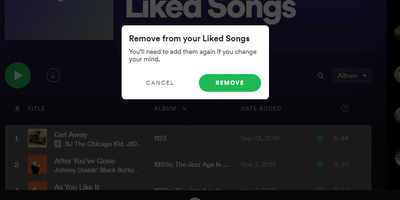
I'd recommend logging out and back in as a first step then trying to connect on a friend/sibling device and do the same action.
Let me know how it goes 🙂

- Mark as New
- Bookmark
- Subscribe
- Mute
- Subscribe to RSS Feed
- Permalink
- Report Inappropriate Content
Hey @delowder,
Thanks for the post.
Currently there is no way to clear your liked songs all at once. You'd have to unlike songs individually.
Another option would be to transfer the playlists from your current account to a new one, following this Guide. This way your Liked songs won't be transferred over.
Hope this information was helpful. Don't hesitate to reach out again if you have questions.
- Mark as New
- Bookmark
- Subscribe
- Mute
- Subscribe to RSS Feed
- Permalink
- Report Inappropriate Content
@OneByBoo - unfortunately this did not help. Ctrl+A does not work at all. I select the first song, then scroll all the way down to the last song, hold SHIFT and select the last song, then choose remove selected songs, but it only removes a subset of the songs. this operation is not functioning as it should.

- Mark as New
- Bookmark
- Subscribe
- Mute
- Subscribe to RSS Feed
- Permalink
- Report Inappropriate Content
Hey @delowder,
Thanks for the info.
Could you try the following:
Choose a song>press Ctrl+A>right click and then choose Remove from your Liked Songs
In case that doesn't work, you can try on another device to see if that helps.
If nothing changes, could you share with us a video recording of what you're seeing? We'll look into this further.
Keep us posted.
- Mark as New
- Bookmark
- Subscribe
- Mute
- Subscribe to RSS Feed
- Permalink
- Report Inappropriate Content
UPDATE: Since Spotify software will not work correctly and cannot solve this simple problem, I have devised another functional method. I am using an automated mouse click app to un-like each song in my library one at a time. Every now and then it hangs because it depends on the list of songs to update after each song is un-liked, and then I have to manually refresh Spotify. However it does work and will take about 6 hours to complete. Also, I can set it and forget it.

- Mark as New
- Bookmark
- Subscribe
- Mute
- Subscribe to RSS Feed
- Permalink
- Report Inappropriate Content
Hey!
I had the same issue which was solved by
Choose a song>press Ctrl+A>right click and then pressing Delete button
It cleared all the songs from the liked playlist

- Mark as New
- Bookmark
- Subscribe
- Mute
- Subscribe to RSS Feed
- Permalink
- Report Inappropriate Content
Found the solution. You go to the playlist, click on a song but not the three dots, anywhere else so the song is highlighted then press and hold shift and then press down arrow until it highlights all of them. Then carefully go to the three dots, right click and then option comes up to remove from.playlist. if you accidentally click the three dots with the left click then it resets the selection and you have to start again.

Suggested posts

Hey there you, Yeah, you! 😁 Welcome - we're glad you joined the Spotify Community! While you here, let's have a fun game and get…
