- Home
- Help
- Desktop Windows
- Re: [Bug] [New UI] Album Artwork Cut Off
Help Wizard
Step 1
Type in your question below and we'll check to see what answers we can find...
Loading article...
Submitting...
If you couldn't find any answers in the previous step then we need to post your question in the community and wait for someone to respond. You'll be notified when that happens.
Simply add some detail to your question and refine the title if needed, choose the relevant category, then post.
Just quickly...
Before we can post your question we need you to quickly make an account (or sign in if you already have one).
Don't worry - it's quick and painless! Just click below, and once you're logged in we'll bring you right back here and post your question. We'll remember what you've already typed in so you won't have to do it again.
FAQs
Please see below the most popular frequently asked questions.
Loading article...
Loading faqs...
Ongoing Issues
Please see below the current ongoing issues which are under investigation.
Loading issue...
Loading ongoing issues...
Help categories
Account & Payment
Using Spotify
Listen Everywhere
[Bug] [New UI] Album Artwork Cut Off
Solved!
- Mark as New
- Bookmark
- Subscribe
- Mute
- Subscribe to RSS Feed
- Permalink
- Report Inappropriate Content
Plan
Free
Country
USA
Device
Dell Inspiron 16 Plus 7620
Operating System
Edition Windows 11 Pro
Version 22H2
Installed on 10/6/2022
OS build 22621.1702
Experience Windows Feature Experience Pack 1000.22641.1000.0
Spotify Version
Spotify for Windows
1.2.11.916.geb595a67
My Question or Issue
I've noticed a bug in the new UI. If the title or artist line in the now playing bar at the bottom of the screen is too long, the album artwork gets cut off. The text can also be cut off when moving the affected album artwork out of the bar. There are some examples below.
Please note, none of my screenshots are cut off. That is the edge of my monitor.
Reinstalling Spotify has not helped.

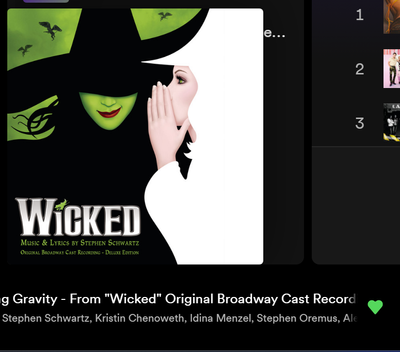




Solved! Go to Solution.
- Labels:
-
album artwork
-
bug
-
new UI
-
Now playing
-
UI
- Subscribe to RSS Feed
- Mark Topic as New
- Mark Topic as Read
- Float this Topic for Current User
- Bookmark
- Subscribe
- Printer Friendly Page
Accepted Solutions
- Mark as New
- Bookmark
- Subscribe
- Mute
- Subscribe to RSS Feed
- Permalink
- Report Inappropriate Content
I haven't noticed it since the update with the Now Playing View rolled out.

- Mark as New
- Bookmark
- Subscribe
- Mute
- Subscribe to RSS Feed
- Permalink
- Report Inappropriate Content
Misunderstood the post, I thought the overlap was meant not the issue with the small album art. Sadly I can't find the delete here.
- Mark as New
- Bookmark
- Subscribe
- Mute
- Subscribe to RSS Feed
- Permalink
- Report Inappropriate Content
The community does not have a delete button for users. Editing your message is the best you can do.


- Mark as New
- Bookmark
- Subscribe
- Mute
- Subscribe to RSS Feed
- Permalink
- Report Inappropriate Content
Hey @kaworu_bloodpaw
Sorry for the late reply.
Are you still having this issue in the latest desktop app version?
- Mark as New
- Bookmark
- Subscribe
- Mute
- Subscribe to RSS Feed
- Permalink
- Report Inappropriate Content
I haven't noticed it since the update with the Now Playing View rolled out.


- Mark as New
- Bookmark
- Subscribe
- Mute
- Subscribe to RSS Feed
- Permalink
- Report Inappropriate Content
Hey there @kaworu_bloodpaw,
Thank you for your reply. We're glad to hear everything is in order now. If anything else comes up, just let us know.
If you need a hand with anything else, we're always a post away.

Suggested posts

Hey there you, Yeah, you! 😁 Welcome - we're glad you joined the Spotify Community! While you here, let's have a fun game and get…
