- Home
- Help
- Desktop Windows
- Error when editing playlist
Help Wizard
Step 1
Type in your question below and we'll check to see what answers we can find...
Loading article...
Submitting...
If you couldn't find any answers in the previous step then we need to post your question in the community and wait for someone to respond. You'll be notified when that happens.
Simply add some detail to your question and refine the title if needed, choose the relevant category, then post.
Just quickly...
Before we can post your question we need you to quickly make an account (or sign in if you already have one).
Don't worry - it's quick and painless! Just click below, and once you're logged in we'll bring you right back here and post your question. We'll remember what you've already typed in so you won't have to do it again.
FAQs
Please see below the most popular frequently asked questions.
Loading article...
Loading faqs...
Ongoing Issues
Please see below the current ongoing issues which are under investigation.
Loading issue...
Loading ongoing issues...
Help categories
Account & Payment
Using Spotify
Listen Everywhere
Error when editing playlist
Error when editing playlist

- Mark as New
- Bookmark
- Subscribe
- Mute
- Subscribe to RSS Feed
- Permalink
- Report Inappropriate Content
I am basically reinvigorating an error report that was closed as fixed without the problem actually being resolved, at least not for me.
https://community.spotify.com/t5/Ongoing-Issues/Web-Player-Error-when-editing-playlist/idc-p/5249758
The post was actually started by a mod:
Hey folks,
We've been getting reports that some users are getting an error when pressing save after editing their playlist (name, description, cover art) on the Web Player.
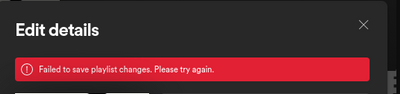
We’ve passed your info on to the relevant team, who are currently looking into it.
If you’re experiencing this issue, make sure to click +VOTE and Subscribe to the thread to be notified of any developments.
Thanks!
I added the following to that report:
Confirming same on Win 10 in the desktop and Chrome platforms as well as iOS 14.6 on an XS Max. You create a playlist on one device and you can't rename it and it doesn't show up on any other device. It's as if the new playlists you are creating don't exist at all. Not trying any troubleshooting since it's apparently a waste of time and clearly an issue on Spotify's end as it affects every device I use.
- Subscribe to RSS Feed
- Mark Topic as New
- Mark Topic as Read
- Float this Topic for Current User
- Bookmark
- Subscribe
- Printer Friendly Page

- Mark as New
- Bookmark
- Subscribe
- Mute
- Subscribe to RSS Feed
- Permalink
- Report Inappropriate Content
Hi @planetneutral,
Thank you for posting on the Community!
This issue was supposed to be fixed with the latest update. Could you run a clean reinstall of the app to start from zero?
On your Windows 10 PC, please make sure to download it directly from the Microsoft Store.
If this doesn't work, could you log in with another account, such as a friend's or a family member's to see if the issue persists? This can help us determine if this is isolated to your account, or if it's something else.
Keep us posted.
- Mark as New
- Bookmark
- Subscribe
- Mute
- Subscribe to RSS Feed
- Permalink
- Report Inappropriate Content
I had done the clean install before reposting the topic. But I did just try logging in with a different account and did NOT have the issue. So I guess my account has been flagged? The problem manifests on every platform, although not exactly in the same way.
- Mark as New
- Bookmark
- Subscribe
- Mute
- Subscribe to RSS Feed
- Permalink
- Report Inappropriate Content
As an example of it being a cross-platform issue, I made a change to an existing playlist on iOS. It actually let me make the change, but now the playlist is totally gone from both the Win10 app from the Microsoft Store and from the web player.
- Mark as New
- Bookmark
- Subscribe
- Mute
- Subscribe to RSS Feed
- Permalink
- Report Inappropriate Content
Hey there @planetneutral,
Thank you for your swift reply.
In this case, it seems like this issue is isolated to your account, so we suggest you contact the folks from Customer Support who can take a deeper look into it. Here is the link, please make sure to share the link to this thread so they can see all the information shared.
Keep us in the loop here and let us know if you have any more questions.
- Mark as New
- Bookmark
- Subscribe
- Mute
- Subscribe to RSS Feed
- Permalink
- Report Inappropriate Content
After about 75 minutes of chat agent tomfoolery, during which I recorded and emailed support a video of the Win10 desktop behavior, we got to "This case will need to be escalated to a specialist team." They are supposed to email me, but nothing has happened yet.

Suggested posts

Hey there you, Yeah, you! 😁 Welcome - we're glad you joined the Spotify Community! While you here, let's have a fun game and get…
