- Home
- Help
- Your Library
- Re: Desktop: New Your Library sidebar
Help Wizard
Step 1
Type in your question below and we'll check to see what answers we can find...
Loading article...
Submitting...
If you couldn't find any answers in the previous step then we need to post your question in the community and wait for someone to respond. You'll be notified when that happens.
Simply add some detail to your question and refine the title if needed, choose the relevant category, then post.
Just quickly...
Before we can post your question we need you to quickly make an account (or sign in if you already have one).
Don't worry - it's quick and painless! Just click below, and once you're logged in we'll bring you right back here and post your question. We'll remember what you've already typed in so you won't have to do it again.
FAQs
Please see below the most popular frequently asked questions.
Loading article...
Loading faqs...
Ongoing Issues
Please see below the current ongoing issues which are under investigation.
Loading issue...
Loading ongoing issues...
Help categories
Account & Payment
Using Spotify
Listen Everywhere
Desktop: New Your Library sidebar
Solved!

- Mark as New
- Bookmark
- Subscribe
- Mute
- Subscribe to RSS Feed
- Permalink
- Report Inappropriate Content
Spotify is introducing a new Your Library sidebar in the desktop app and Web Player.
The new Your Library sidebar improves navigation and makes it easier and faster to collect and retrieve all types of content, bringing new features to desktop that you're already familiar with in the mobile app. The new sidebar is also more customizable than before to meet different preferences.
This thread is your go-to destination for learning what's new, asking questions, getting help for issues you might have, as well as to share your feedback about the new Your Library sidebar for desktop. Also, do you have any tips for other users on how you are using the new Your Library sidebar? We'd love to hear them.
What's new in the Your Library sidebar?
- See your entire collection and all of the content types (not just playlists)
- Filters for your collection (Playlists, Artists, Albums, Podcasts) that can be combined with other filters (By you, By Spotify, Downloaded)
- Sort options for your collection (Recents, Recently Added, Alphabetical, Creator, Custom Order)
- Chosen filters and sort options will be remembered in the sidebar across restarts of the desktop app
- Search through your collection in the sidebar
- Pinned library items to find your favorites, faster – current limit is 4 (Playlists, Playlist Folders, Artists, Albums, Podcasts)
- Art covers are now shown in the sidebar
- Compact library layout (no art covers) is available as an option in Settings to increase content density
- Dedicated + (plus) button to create Playlists and Playlist Folders
- Flexible Sizing: A collapsed library view (with only art covers) to maximize the browsing area, a regular width view, and an expanded view for more focused library management and curation. (you can also drag to customize the size)
- In the expanded library view, you have options for list view, compact view, and a grid view. The list and compact views show you more details in 2 columns, Date Added and Last Played, and the grid view allows you to see larger art covers.
- Playlist Folders can still be expanded into the sidebar in a tree view, and now when you click on them, the sidebar only shows the Playlist Folder and what's inside for a more focused view.
- Menu option to move a playlist to a folder (with search)
Note: The Your Library sidebar experience will be the same for the most part in the Web Player. However, the Web Player does not support all of the features found in the desktop app. To be able to use all of the features, you can download the desktop app right here.
Tips to get started:
If you need a familiar experience to help you get started with the new Your Library sidebar, here's how to get it as close as possible to the old sidebar that previously only showed playlists:
- In the left "Your Library" sidebar, click on the "Playlists" filter at the top.
- Then, in the drop down menu select "Custom Order" under "Sort by". You will then see your previous playlist order and be able to move your playlists and folders like before.

- Your currently chosen filters and sort options will be remembered across restarts of the desktop app.
- If you would like to only see text in the Your Library sidebar (no art covers), go to the drop down menu and at the bottom of the menu click on "Compact" under "View as".


- Flexible Sizing: You can drag the Your Library sidebar to different sizes. Fully expand the sidebar by clicking the arrow button at the top, and fully collapse the sidebar by clicking on the "Your Library" heading to see only art covers.
- At the top, you can scroll through the different filters with your mouse scroll wheel for faster navigation when the sidebar is set to a smaller size.
Walkthrough of the basics:
Sidebar List:
You can now see your entire collection and all of the content types (not just playlists) in the sidebar list. At the top, click on the filters to filter the content you want to see, and click on the drop down menu to change the sort order or view of the list. To create a new Playlist or Playlist Folder, click on the + (plus) button at the top right corner of the sidebar. To search through your collection, click on the search button.

Filter Options:
At the top, click on the filters to filter the content you want to see. You can scroll through the different filters with your mouse scroll wheel for faster navigation when the sidebar is set to a smaller size.
To remove the filter, click on the X or the currently selected filter and then choose another filter to see another type of content. Having no filter selected will show all types of content mixed in the list.
- Playlists
- Artists
- Albums
- Podcasts & Shows
- These can be combined with other filters: By you, By Spotify, Downloaded
Sort Options:
At the top, click on the drop down menu to change the sort order of the list under "Sort by".
- Recents
- Recently Added
- Alphabetical
- Creator
When the "Playlists" filter is selected, you have the option to see your playlists in your own custom order.
- Custom Order
When the "Podcasts & Shows" filter is selected, you have the following option:
- Recently Updated
View Options:
At the top, click on the drop down menu to change the view of the list under "View as".
- Compact (view text only without art covers)
- List
- Grid (bigger art covers)
Flexible Sizing:
You can hover over and click on the right edge of the sidebar to drag it to your preferred width. You can also fully expand the sidebar by clicking the arrow button at the top, and fully collapse the sidebar by clicking on the "Your Library" heading to see only art covers.
In the expanded library view, you have options for list view, compact view, and a grid view. The list and compact views show you more details in 2 columns, Date Added and Last Played, and the grid view allows you to see larger art covers.

FAQ:
This section will answer your frequently asked questions and will be updated with the latest answers.
Related help articles on the support website:
• Your Library • Sort and filter • Keyboard Shortcuts
Can I view the Your Library page in the main browsing area like before?
- Unfortunately, the old Your Library page in the main browsing area is being discontinued with the release of the new Your Library sidebar. You can adjust the size of the Your Library sidebar to be bigger and you can also enable the "grid view" if you would like to see bigger art covers.
How do I see only my playlists in the sidebar like I used to be able to, I can't drag and move my playlists or folders anymore?
-
In the left "Your Library" sidebar, click on the "Playlists" filter at the top.
Then, in the sort options drop down menu select "Custom Order". You will then see your previous playlist order and be able to move your playlists and folders like before.
Your currently chosen filters and sort options will be remembered across restarts of the desktop app.
I don't want to see art cover images in the sidebar, how do I turn them off?
- If you would like to only see text in the Your Library sidebar (no art covers), go to the drop down menu and at the bottom of the menu click on "Compact" under "View as".
How do I get the album art to expand in the bottom left corner like before? When I try to expand the album art, it opens the Now Playing View sidebar to the right.
-
Unfortunately, that is no longer possible. When you expand the album art in the bottom left corner of the app, it will no longer hover over the Your Library sidebar. Instead, the new right sidebar will open up. You can resize the Now Playing View sidebar to your preferred size.
You can read more information about this by going here.
How do I play or shuffle play a Playlist Folder now? (I don't see dedicated pages with play / shuffle options anymore)
- Right click on a Playlist Folder and select the "Play" option. To shuffle play, make sure to turn on the shuffle mode first before selecting the "Play" option in the right click menu.
How do I get to my Local Files now?
-
In the left "Your Library" sidebar, click on the "Playlists" filter at the top.
Then, in the sort drop down select "Custom Order".
The "Local Files" playlist will be near the top of the list under your pinned items (if any).
Feedback:
Where can I give my feedback about the new Your Library sidebar in the desktop app?
- We welcome your feedback about this change. The best way to share your feedback is to comment here in this thread.
Solved! Go to Solution.
- Subscribe to RSS Feed
- Mark Topic as New
- Mark Topic as Read
- Float this Topic for Current User
- Bookmark
- Subscribe
- Printer Friendly Page

- Mark as New
- Bookmark
- Subscribe
- Mute
- Subscribe to RSS Feed
- Permalink
- Report Inappropriate Content
On Mac, you should be able to access it by pressing Command + /
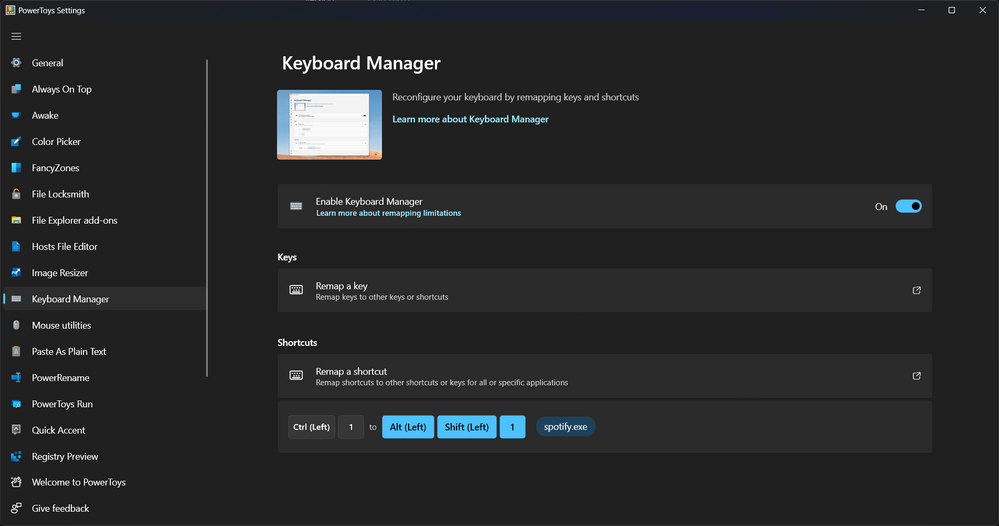
They cannot be natively changed. I know Windows has a tool for custom keyboard shortcuts for the entire system or per app. I have no idea if something like this exists on Mac.
Ex:
I mapped Control + 1 to the keyboard shortcut for the playlists screen on Spotify

- Mark as New
- Bookmark
- Subscribe
- Mute
- Subscribe to RSS Feed
- Permalink
- Report Inappropriate Content
Recents are playlists/albums you’ve recently listened to vs Recently Added to your Library

- Mark as New
- Bookmark
- Subscribe
- Mute
- Subscribe to RSS Feed
- Permalink
- Report Inappropriate Content
Is there a way to keep the sidebar folders and subfolders stagnant? For example, if I click a folder, I would like to just see it expand below the folder, and not take me to another sidebar screen. The dropdown arrows being on the right really throw me off and are small. I would prefer the arrows to be on the left of the folders.

- Mark as New
- Bookmark
- Subscribe
- Mute
- Subscribe to RSS Feed
- Permalink
- Report Inappropriate Content
You've made Spotify worse for the final time, think it's time for me to cancel my sub and switch to a service doesn't revolve around arbitrarily releasing meaningless things, deprecating or obscuring useful features and obtusely adjusting the UI/UX constantly for exclusively worse results. Sick of your **bleep**, Spotify.

- Mark as New
- Bookmark
- Subscribe
- Mute
- Subscribe to RSS Feed
- Permalink
- Report Inappropriate Content
Spotify has been on a steady decent into an absolutely atrocious user experience ever since the complete re-haul update that introduced the heart button to "like" songs.
Itunes figured out the intuitive and easy-to-browse music library 20 YEARS AGO. It should absolutely NOT be more complicated than the following:
I save individual songs, albums, or artists.
Those songs, whether saved via album, artist, or individual song, go into ONE CENTRAL LIBRARY that can be browsed by the aforementioned categories (Songs, Albums, Artists).
The immense changes to this simple and intuitive formula have served no purpose other than to complicate and clutter what should be a very straightforward experience. It seems as though your design team is trying to justify their employment by arbitrarily adding features and changes that no one has asked for. It is some of the most incompetent development I've seen in a music platform. If there is not a swift and meaningful effort to backpedal on these pointless masturbatory changes, I will absolutely be switching services. I've been patient and have given spotify the benefit of the doubt these last few years, but after this update it is clear that your company does not listen to its userbase, and are out of touch with what music listeners want. To find & listen to their saved music without hassle & confusion.

- Mark as New
- Bookmark
- Subscribe
- Mute
- Subscribe to RSS Feed
- Permalink
- Report Inappropriate Content
Greetings Spotify Dev Team,
I needed to immediately reach out and tell you how ABSOLUTELY AWFUL AND NON-FUNCTIONAL the new update to your desktop app is. I have used the desktop app for over a year without any changes and have been a customer for over seven years. Within the past hour, everything has been switched around on the desktop app so it's not only extremely difficult to navigate but wildly frustrating from a user perspective. Why would your company completely change the format of your perfectly functional desktop app where I'm now forced to use the small, shitty side menu to navigate through all of my playlists, podcasts, and artists in one long and never-ending list?! It's evident that no critical thinking skills or preliminary user testing were used to gauge if this change would actually improve the app.
Also, the fact that your company didn't notify your paying customers ahead of time before this change was enabled is extremely disappointing because now my desktop app is basically unusable and frankly, I'm now having to re-consider other paid music streaming services that have a more functional desktop app. I just spoke with a few friends who also use the desktop app, and they are also extremely dissatisfied with the unexpected forced update.
I've always respected Spotify for its openness and willingness to work with users and their feedback. Please take this feedback into serious consideration before making any more 'new' changes to the desktop app. I would also like you to add a toggle in the Settings section that would allow existing paid users to switch back to the old format so I can actually navigate my content with ease.


- Mark as New
- Bookmark
- Subscribe
- Mute
- Subscribe to RSS Feed
- Permalink
- Report Inappropriate Content
ALT+SHIFT+3
So they took away the buttons that do this, but the functionality is still there via a shortcut? That's just silly. They could have eliminated 90% of peoples complaints just by LEAVING THE BUTTONS THERE. Of course that doesn't fix the monstrosity that is the album art, but they did claim they are fixing that...
Thanks for the tip!

- Mark as New
- Bookmark
- Subscribe
- Mute
- Subscribe to RSS Feed
- Permalink
- Report Inappropriate Content
This new UI is awful as someone who basically only ever looks my liked albums.
- The list of albums is now way smaller even at its max size. I want it to be basically full screen.
- There are less albums per row so I have to scroll more to see the same number of albums, with no way to make the sidebar wider while making the album art smaller.
- I don't need to see the list of albums while I'm listening to one, at that point all I care about is the tracklist.
- The currently playing album art is incredibly obnoxious, it's in the way of like a quarter of the albums I can see at a time. I don't want to have to constantly be collapsing and expanding it to maintain usability.
- I can no longer zoom the app. The old UI had plenty of space, I was able to zoom in a bit and still be comfortable. I want bigger album art with less albums visible at a time, but I can't adjust that anymore. The old version let me have 6 albums per row with just under 4 rows visible. With the new library and album art at its max size, it lets me have 4 albums per row with just over 2 rows visible.
I'm not completely opposed to this new sidebar-heavy design, but it needs a lot of reworks before it's anywhere near as comfortable to use. The two biggest changes I want to see:
- Auto-collapse my library when I listen to something, then re-expand it the first time I hit "go back"
- When my library is collapsed, make the album art take up full width of the sidebar, and keep the list of albums confined to a smaller space directly above it

- Mark as New
- Bookmark
- Subscribe
- Mute
- Subscribe to RSS Feed
- Permalink
- Report Inappropriate Content
Microsoft already tried to make Windows more like mobile and it was an absolute disaster.. so here is a small history lesson for Windows in the last 23 years
Windows XP 2001
Windows Vista 2007
Windows 7 2009
Windows 8 2012 (the most hated version of Windows in the 20th century)
the community at large hated it for many reasons Lack of transparency. disregard for community feedback too much emphasis on touch features, complete scrap of all similarities to previous Windows path structure systems.
Windows 8.1 2013 (the attempt to salvage Windows 8 )
the community hated it for all the same reasons… but it was also a clunky feeling. disorganized, was basically like having two operating systems installed at once.
Windows 10 2014 They realized people didn't want their computers to feel like a phone/tablets
and finally stopped trying to force their vision on their community... I hope you do the same.
the only reason mobile platforms are designed the way they are is that the screen size is tiny in comparison and you need to condense things to make the platform usable... that is not an issue with pc. you have at LEAST ten times the screen space. Gamers, streamers. and workers alike have multiple displays. we don't need or want things to be like mobile for good reason… A large number of people from the computer community have chosen desktops over tablets. gaming consoles, or Macbooks because Windows has always offered more control. We like having options. because there is competition it incentivises companies to make a better product. unlike a lot of other platforms. if we don't like something, we have other options.
And by the way, all the curves and rounded edges you've added to the UI…. PC users dropped those back in 2012… the curves make Spotify feel like a 2005 program… and you don't even have all these curves on the Android version…. only on your 6 most recent playlists… come on guys….

- Mark as New
- Bookmark
- Subscribe
- Mute
- Subscribe to RSS Feed
- Permalink
- Report Inappropriate Content
I cannot find the local files in this new version. I dont have a your library option. This is all i see. Help. I need those local files.


- Mark as New
- Bookmark
- Subscribe
- Mute
- Subscribe to RSS Feed
- Permalink
- Report Inappropriate Content
I don't mind this new UI in collapsed mode. The only thing I don't understand is why we can't still keep Artists/Playlists/Albums/Podcasts as main items in the vertical list(ie underneath home). Having to horizontally scroll to get to the different sections isn't particularly good UX.
Edit: sorry sfag01, didn't mean to reply directly to you.
- Mark as New
- Bookmark
- Subscribe
- Mute
- Subscribe to RSS Feed
- Permalink
- Report Inappropriate Content
This really is a poor update. As others have said, this is like shoving a mobile design for small monitors, for users that don't really curate their own libraries, onto desktop users who have lots of monitor space and probably complex collections of playlists, saved artists and local files.
For example, why does the top left just have 'Home' and 'Search'. Why are the buttons removed for other things? It feels like such a design oversight.
And whilst we're at it, why can we only pin 4 items on a mobile? Why not unlimited? It's not a processing power limitation, so why are you limiting customers options? I literally have no idea.
I can sort of understand that you want us to stop making our own playlists and become mindless community playlist shuffle players, who end up listening to everything you want to promote, but that's just not why I'm here. I'm here to listen to the music I want to listen to. If that isn't what you want to offer, at least be clear so I can take my business elsewhere.
- Mark as New
- Bookmark
- Subscribe
- Mute
- Subscribe to RSS Feed
- Permalink
- Report Inappropriate Content
+ Who messes with a working thing out of the blue and spoils it for no reason?
- Of course "Spotify"
Visually, I don't care what you do. But why mess up a layout that works fine in general? Thanks to this **bleep**ing update you made, I learned that it is a great privilege to sort the same lists in different ways on the phone and on the computer. Why would my ranking on the computer affect the ranking on the phone? Is this a chat app? Of course not. Since I spend more time on the computer, I use more lists. I can only listen to the phone for a certain period of time during the journey. But since I spend more time in front of the computer, I listen more. I would like to pin more lists because of this situation. But it is limited to 4 pieces. Nonsense!
I hope you fix this crappy thing you've done as soon as possible or give a proper update.

- Mark as New
- Bookmark
- Subscribe
- Mute
- Subscribe to RSS Feed
- Permalink
- Report Inappropriate Content
Revert the layout back to the previous style

- Mark as New
- Bookmark
- Subscribe
- Mute
- Subscribe to RSS Feed
- Permalink
- Report Inappropriate Content
Amazing design!!!
- Mark as New
- Bookmark
- Subscribe
- Mute
- Subscribe to RSS Feed
- Permalink
- Report Inappropriate Content
Who do these new UI updates get tested on? This latest one is appalling - genuinely appallingly bad. The sidebar layout is horrible, and reduces functionality! I can't believe somebody actually thought this would be a good idea to implement.

- Mark as New
- Bookmark
- Subscribe
- Mute
- Subscribe to RSS Feed
- Permalink
- Report Inappropriate Content
New interface is a disaster, please go back to the old one. I use Spotify on a desktop. I used to be able to click and hold on a folder and reposition it in my library. Now I can only do this if I reposition it inside another folder, ie it can't stand alone as an independent folder. Also, as I drag the folder up or down, it opens up each folder that it passes! Result is I then have to manually go through all those folders and close them.

- Mark as New
- Bookmark
- Subscribe
- Mute
- Subscribe to RSS Feed
- Permalink
- Report Inappropriate Content
This doesn't bother me as much as when the dynamic sorting view or whatever was rolled out on mobile (which is awful) or the idea of auto-playing videos on the home page (which I can't imagine anyone wanting). I did have my own little peeves with the old library desktop view (permanently pinned giant icons for the "favorites" playlist didn't make sense if you don't use that function, or even really if you do).
I do use the desktop a lot but I'm not as protective of its layout or functionality as I am for mobile (I know many are the opposite). I don't think I love this, and I do think it seems largely worse overall, but it doesn't bother me so much that I'm not willing to give it a minute to make sure it's not just change aversion (or to get used to the new worse product, so long as it's not too much worse, if that's the case).
But I do wonder about the Spotify UX philosophy sometimes. The design team has a whole blog with very broad principles and jargon, but in practice I do wonder why most changes seem to make things worse. Some of that almost has to be pure resistance to change, but not all. I think the fact that so many people use Spotify that you're always just going to have people using it in different ways is going to affect that. It becomes "one size fits none." But I wouldn't know how to avoid that. The paid experts sure don't seem to.
I appreciate the efforts of these "new feature/redesign how-to" posts. I think they can help with the "how" sometimes (and sometimes that's enough, the update is fine we just need to know where to click now). It's got to be tough, however, when the update is not necessarily embraced. I know it's tough from the user side. But I also can see why Spotify wouldn't want more transparency for this kind of thing either.

- Mark as New
- Bookmark
- Subscribe
- Mute
- Subscribe to RSS Feed
- Permalink
- Report Inappropriate Content
Oh my god this new desktop nav is absolutely terrible. It’s okay for the desktop app to feel different than mobile—please stop trying to make them the same it doesn’t work.
- Mark as New
- Bookmark
- Subscribe
- Mute
- Subscribe to RSS Feed
- Permalink
- Report Inappropriate Content
Im sorry but this new UI is atrocious, please give us the option to change it back.
First the like button on mobile, now this. what next?

Suggested posts

Hey there you, Yeah, you! 😁 Welcome - we're glad you joined the Spotify Community! While you here, let's have a fun game and get…
