- Home
- Help
- Your Library
- Desktop: New Your Library sidebar
Help Wizard
Step 1
Type in your question below and we'll check to see what answers we can find...
Loading article...
Submitting...
If you couldn't find any answers in the previous step then we need to post your question in the community and wait for someone to respond. You'll be notified when that happens.
Simply add some detail to your question and refine the title if needed, choose the relevant category, then post.
Just quickly...
Before we can post your question we need you to quickly make an account (or sign in if you already have one).
Don't worry - it's quick and painless! Just click below, and once you're logged in we'll bring you right back here and post your question. We'll remember what you've already typed in so you won't have to do it again.
FAQs
Please see below the most popular frequently asked questions.
Loading article...
Loading faqs...
Ongoing Issues
Please see below the current ongoing issues which are under investigation.
Loading issue...
Loading ongoing issues...
Help categories
Account & Payment
Using Spotify
Listen Everywhere
Desktop: New Your Library sidebar
Solved!

- Mark as New
- Bookmark
- Subscribe
- Mute
- Subscribe to RSS Feed
- Permalink
- Report Inappropriate Content
Spotify is introducing a new Your Library sidebar in the desktop app and Web Player.
The new Your Library sidebar improves navigation and makes it easier and faster to collect and retrieve all types of content, bringing new features to desktop that you're already familiar with in the mobile app. The new sidebar is also more customizable than before to meet different preferences.
This thread is your go-to destination for learning what's new, asking questions, getting help for issues you might have, as well as to share your feedback about the new Your Library sidebar for desktop. Also, do you have any tips for other users on how you are using the new Your Library sidebar? We'd love to hear them.
What's new in the Your Library sidebar?
- See your entire collection and all of the content types (not just playlists)
- Filters for your collection (Playlists, Artists, Albums, Podcasts) that can be combined with other filters (By you, By Spotify, Downloaded)
- Sort options for your collection (Recents, Recently Added, Alphabetical, Creator, Custom Order)
- Chosen filters and sort options will be remembered in the sidebar across restarts of the desktop app
- Search through your collection in the sidebar
- Pinned library items to find your favorites, faster – current limit is 4 (Playlists, Playlist Folders, Artists, Albums, Podcasts)
- Art covers are now shown in the sidebar
- Compact library layout (no art covers) is available as an option in Settings to increase content density
- Dedicated + (plus) button to create Playlists and Playlist Folders
- Flexible Sizing: A collapsed library view (with only art covers) to maximize the browsing area, a regular width view, and an expanded view for more focused library management and curation. (you can also drag to customize the size)
- In the expanded library view, you have options for list view, compact view, and a grid view. The list and compact views show you more details in 2 columns, Date Added and Last Played, and the grid view allows you to see larger art covers.
- Playlist Folders can still be expanded into the sidebar in a tree view, and now when you click on them, the sidebar only shows the Playlist Folder and what's inside for a more focused view.
- Menu option to move a playlist to a folder (with search)
Note: The Your Library sidebar experience will be the same for the most part in the Web Player. However, the Web Player does not support all of the features found in the desktop app. To be able to use all of the features, you can download the desktop app right here.
Tips to get started:
If you need a familiar experience to help you get started with the new Your Library sidebar, here's how to get it as close as possible to the old sidebar that previously only showed playlists:
- In the left "Your Library" sidebar, click on the "Playlists" filter at the top.
- Then, in the drop down menu select "Custom Order" under "Sort by". You will then see your previous playlist order and be able to move your playlists and folders like before.

- Your currently chosen filters and sort options will be remembered across restarts of the desktop app.
- If you would like to only see text in the Your Library sidebar (no art covers), go to the drop down menu and at the bottom of the menu click on "Compact" under "View as".


- Flexible Sizing: You can drag the Your Library sidebar to different sizes. Fully expand the sidebar by clicking the arrow button at the top, and fully collapse the sidebar by clicking on the "Your Library" heading to see only art covers.
- At the top, you can scroll through the different filters with your mouse scroll wheel for faster navigation when the sidebar is set to a smaller size.
Walkthrough of the basics:
Sidebar List:
You can now see your entire collection and all of the content types (not just playlists) in the sidebar list. At the top, click on the filters to filter the content you want to see, and click on the drop down menu to change the sort order or view of the list. To create a new Playlist or Playlist Folder, click on the + (plus) button at the top right corner of the sidebar. To search through your collection, click on the search button.

Filter Options:
At the top, click on the filters to filter the content you want to see. You can scroll through the different filters with your mouse scroll wheel for faster navigation when the sidebar is set to a smaller size.
To remove the filter, click on the X or the currently selected filter and then choose another filter to see another type of content. Having no filter selected will show all types of content mixed in the list.
- Playlists
- Artists
- Albums
- Podcasts & Shows
- These can be combined with other filters: By you, By Spotify, Downloaded
Sort Options:
At the top, click on the drop down menu to change the sort order of the list under "Sort by".
- Recents
- Recently Added
- Alphabetical
- Creator
When the "Playlists" filter is selected, you have the option to see your playlists in your own custom order.
- Custom Order
When the "Podcasts & Shows" filter is selected, you have the following option:
- Recently Updated
View Options:
At the top, click on the drop down menu to change the view of the list under "View as".
- Compact (view text only without art covers)
- List
- Grid (bigger art covers)
Flexible Sizing:
You can hover over and click on the right edge of the sidebar to drag it to your preferred width. You can also fully expand the sidebar by clicking the arrow button at the top, and fully collapse the sidebar by clicking on the "Your Library" heading to see only art covers.
In the expanded library view, you have options for list view, compact view, and a grid view. The list and compact views show you more details in 2 columns, Date Added and Last Played, and the grid view allows you to see larger art covers.

FAQ:
This section will answer your frequently asked questions and will be updated with the latest answers.
Related help articles on the support website:
• Your Library • Sort and filter • Keyboard Shortcuts
Can I view the Your Library page in the main browsing area like before?
- Unfortunately, the old Your Library page in the main browsing area is being discontinued with the release of the new Your Library sidebar. You can adjust the size of the Your Library sidebar to be bigger and you can also enable the "grid view" if you would like to see bigger art covers.
How do I see only my playlists in the sidebar like I used to be able to, I can't drag and move my playlists or folders anymore?
-
In the left "Your Library" sidebar, click on the "Playlists" filter at the top.
Then, in the sort options drop down menu select "Custom Order". You will then see your previous playlist order and be able to move your playlists and folders like before.
Your currently chosen filters and sort options will be remembered across restarts of the desktop app.
I don't want to see art cover images in the sidebar, how do I turn them off?
- If you would like to only see text in the Your Library sidebar (no art covers), go to the drop down menu and at the bottom of the menu click on "Compact" under "View as".
How do I get the album art to expand in the bottom left corner like before? When I try to expand the album art, it opens the Now Playing View sidebar to the right.
-
Unfortunately, that is no longer possible. When you expand the album art in the bottom left corner of the app, it will no longer hover over the Your Library sidebar. Instead, the new right sidebar will open up. You can resize the Now Playing View sidebar to your preferred size.
You can read more information about this by going here.
How do I play or shuffle play a Playlist Folder now? (I don't see dedicated pages with play / shuffle options anymore)
- Right click on a Playlist Folder and select the "Play" option. To shuffle play, make sure to turn on the shuffle mode first before selecting the "Play" option in the right click menu.
How do I get to my Local Files now?
-
In the left "Your Library" sidebar, click on the "Playlists" filter at the top.
Then, in the sort drop down select "Custom Order".
The "Local Files" playlist will be near the top of the list under your pinned items (if any).
Feedback:
Where can I give my feedback about the new Your Library sidebar in the desktop app?
- We welcome your feedback about this change. The best way to share your feedback is to comment here in this thread.
Solved! Go to Solution.
- Subscribe to RSS Feed
- Mark Topic as New
- Mark Topic as Read
- Float this Topic for Current User
- Bookmark
- Subscribe
- Printer Friendly Page

- Mark as New
- Bookmark
- Subscribe
- Mute
- Subscribe to RSS Feed
- Permalink
- Report Inappropriate Content
Now give us the option to get rid of all this cr@p (in red circle):


- Mark as New
- Bookmark
- Subscribe
- Mute
- Subscribe to RSS Feed
- Permalink
- Report Inappropriate Content
If they even did that, they managed to find a group of users which clearly aren't critical of anything; making any info that came out of those groups moot... of course, that's also a way to make sure you wont have to actually improve anything; just get it vetted by people who dont honestly care or can even tell the difference between half-decent UX and bass-ackwards UX, like the current state.
If they'd done that process properly, it wouldn't have been this amount of people with the very exact same piece of feedback chiming in here.
heck, a single serious ux developer/designer should be able to fend off the myriad of mistakes made just by being factual and objective.
It's now been what 4 or 5 months since these changes started and the interaction between mobile and desktop is at least just as broken (and occasionally worse) by playing something entirely different then is selected on the mobile app, or often not even responding at-all, no matter wether the device resides on the exact same network or not; leaving spotify in what i would say a non-functional state.
Once this reached 6m ill reach out for a refund; its not like i hadnt tried to report the matter or tried to get it resolved, spotify just clearly can't care any less about the shape and state of their product, only about the state of the bank statements; so i guess thats where youll have to hit them.

- Mark as New
- Bookmark
- Subscribe
- Mute
- Subscribe to RSS Feed
- Permalink
- Report Inappropriate Content
hi! recently i accidentally reduced the size of my good afternoon tab on desktop. any ideas on how to undo it? its too small and annoys me. ctrl+ doesnt work as it makes everything bigger. also suddenly everytime i add a song to liked a popup which says "added to liked songs" appears. any ideas on how to undo it also? here are some pics:


- Mark as New
- Bookmark
- Subscribe
- Mute
- Subscribe to RSS Feed
- Permalink
- Report Inappropriate Content
That is one step in the right direction. But will there also be a way to activate the library in the main area without using the shortcut Shift+Alt+4? The main issue for most users is the library being stuffed into this small sidebar.
And also: will the cover move back to a place where it makes sense and not the third column on the right?
- Mark as New
- Bookmark
- Subscribe
- Mute
- Subscribe to RSS Feed
- Permalink
- Report Inappropriate Content
Can anybody help with installing an older version? I cannot take this 3-column**bleep** anymore (with the most important field in the smallest column), but everytime I install an older version, the stupid new one appears. How can I install an old version without directly updating this version to the ugly new one?
- Mark as New
- Bookmark
- Subscribe
- Mute
- Subscribe to RSS Feed
- Permalink
- Report Inappropriate Content
Advantages of the new UI:
- you can click the cover and it appears in big version
Disadvantages:
- whole library packed in left column, making it annoying or even impossible to find the things one looks for or to just scroll through the own library to get ideas on what to listen
- ridiculously small cover artwork if I manage to get the library into the main column (by shortcut Alt+Shift+4), artworks do not adjust to size of column (because Spotify apparently does not want user to use the big space for their library)
- instead of having the cover of the currently playing album permanentely left in the bottom corner, it opens a third column on the right. This leads to having the cover artwork 3 times in sight (small cover bottom left + in the main column as currently playing + right column with additional infos no one asked for). This is confusing, ugly and not intuitive. Oh and it closes the "What friends listen"-column of this was open.
- left column useless for people who want their library in main column, so it is now permanentely collapsed in my case, while having to fight with the watered-down main column and weird right column.
It hurts to remember, how intuitive and nearly perfect this app once was.

- Mark as New
- Bookmark
- Subscribe
- Mute
- Subscribe to RSS Feed
- Permalink
- Report Inappropriate Content
neat. We've now established the UX team can admit when they have made a mistake, and roll out a correction. Any idea when the team is going to fix everything else they ruined? Or do we need to wait 'a few years' for them to catch up?
- Mark as New
- Bookmark
- Subscribe
- Mute
- Subscribe to RSS Feed
- Permalink
- Report Inappropriate Content
A recent desktop app update made these home page tile shortcuts smaller. I noticed they were now smaller as well.
Unfortunately, there is no way to change the size of them.
- Mark as New
- Bookmark
- Subscribe
- Mute
- Subscribe to RSS Feed
- Permalink
- Report Inappropriate Content
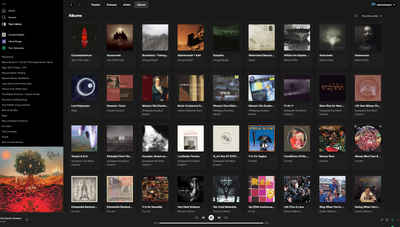
I found out that by installing the version for Windows 7 or 8 (even though I have 10) it does at least have the version with the album still in the lower left and not third column. The rest is still the same **bleep** though:
- Mark as New
- Bookmark
- Subscribe
- Mute
- Subscribe to RSS Feed
- Permalink
- Report Inappropriate Content
nah, i actually enjoy the newer layout, just bugged by the smaller size of the tiles. also great music taste! i absolutely love gy!be, lysf is one of my fav albums of all time. cheers!

- Mark as New
- Bookmark
- Subscribe
- Mute
- Subscribe to RSS Feed
- Permalink
- Report Inappropriate Content
I want the list to be sorted in a specific way

- Mark as New
- Bookmark
- Subscribe
- Mute
- Subscribe to RSS Feed
- Permalink
- Report Inappropriate Content
There is a way to install a modified version of the official Spotify client that is locked to the specific version with old theme and blocked updates, but I'm afraid you cannot post links like this here.
But if you google a specific sentence you'll find a link to github that will have all the instructions how to bring back good ol' Spotify Desktop. It's as simple as running a single-line Powershell script with a few options.

- Mark as New
- Bookmark
- Subscribe
- Mute
- Subscribe to RSS Feed
- Permalink
- Report Inappropriate Content
Thanks a lot Glass_hugh. I've followed the "Usual installation (Old theme)" section from the project you mentioned on GitHub and I have now a proper interface I can use.
Annoying that we have to go to such an extent as premium users to be able to unbreak the product (and this 7 months after the update!). I hoped they could fix it within a couple months after the update, sad that it wasn't the case.

- Mark as New
- Bookmark
- Subscribe
- Mute
- Subscribe to RSS Feed
- Permalink
- Report Inappropriate Content
I don't understand why I can't just look at my library in the middle of my screen so that I'm able to drag and drop playlists between my folders easily.
I use my desktop to organize my library so that when I'm on the go everything is easy to find on my phone. Why would you bring the limitations of the app onto the desktop?

- Mark as New
- Bookmark
- Subscribe
- Mute
- Subscribe to RSS Feed
- Permalink
- Report Inappropriate Content
Opened spotify this morning and now Alt+Shift+4 does not show my library in the main window it filters the terrible side bar. So now i can officially no longer see my albums and playlists side by side making this app completely unusable to me. time to move my library to a different service. i know you dont care about losing a singular user in the grand scheme of things but this update is atrocious. adios

- Mark as New
- Bookmark
- Subscribe
- Mute
- Subscribe to RSS Feed
- Permalink
- Report Inappropriate Content
Stop trying to make desktops apps work like phones! Narrow lists with tiny images are useful for phones because phones are long and skinny. Desktops have big screens. So much space. I wish I could see my library in all that space and not crammed into the tiny sidebar. It's just extremely annoying.
Edit: Let us at least set grid view for one tab (albums) and list view for another (playlists) instead of having to keep the same for everything. That would be an improvement.
- Mark as New
- Bookmark
- Subscribe
- Mute
- Subscribe to RSS Feed
- Permalink
- Report Inappropriate Content
I have done the work for them in Photoshop. This is all I want:
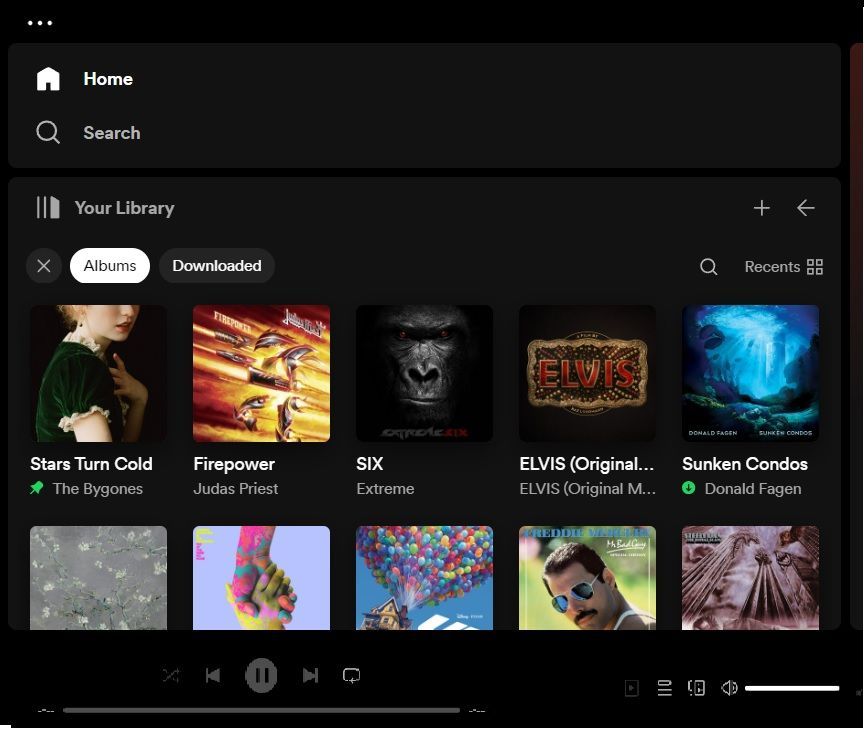
That's it. No suggestions, no recommendations, no other stuff pushed at me. Just the ability to search, add to my library and play!
How difficult can it be to give us the option to switch to something like this?
- Mark as New
- Bookmark
- Subscribe
- Mute
- Subscribe to RSS Feed
- Permalink
- Report Inappropriate Content
Thank you, glass_hugh. That makes it far more bearable.
- Mark as New
- Bookmark
- Subscribe
- Mute
- Subscribe to RSS Feed
- Permalink
- Report Inappropriate Content
Why indeed....


- Mark as New
- Bookmark
- Subscribe
- Mute
- Subscribe to RSS Feed
- Permalink
- Report Inappropriate Content
AH!
I can't believe they took away this workaround. As long as we had that route to a better library view the degradation was manageable. But now we're stuck?

Suggested posts

Hey there you, Yeah, you! 😁 Welcome - we're glad you joined the Spotify Community! While you here, let's have a fun game and get…
