- Home
- Help
- Your Library
- Local File Artwork Doesn't Sync to Android
Help Wizard
Step 1
Type in your question below and we'll check to see what answers we can find...
Loading article...
Submitting...
If you couldn't find any answers in the previous step then we need to post your question in the community and wait for someone to respond. You'll be notified when that happens.
Simply add some detail to your question and refine the title if needed, choose the relevant category, then post.
Just quickly...
Before we can post your question we need you to quickly make an account (or sign in if you already have one).
Don't worry - it's quick and painless! Just click below, and once you're logged in we'll bring you right back here and post your question. We'll remember what you've already typed in so you won't have to do it again.
FAQs
Please see below the most popular frequently asked questions.
Loading article...
Loading faqs...
Ongoing Issues
Please see below the current ongoing issues which are under investigation.
Loading issue...
Loading ongoing issues...
Help categories
Account & Payment
Using Spotify
Listen Everywhere
Local File Artwork Doesn't Sync to Android
Solved!
- Mark as New
- Bookmark
- Subscribe
- Mute
- Subscribe to RSS Feed
- Permalink
- Report Inappropriate Content
Plan
Premium
Country
Australia
Device
Windows 11 Laptop + Galaxy A22 5G (same issue on my iPad 7th Generation, but mostly focused on phone)
Operating System
Laptop - Windows 11 Home 22H2.
Phone - Android 12.
My Question
Having lots of trouble with the local file system on Spotify. I like to make clean versions of songs on my computer (i.e. take out swearing, drug references, etc), and be able to listen to them around and about. What is extremely annoying to me, however, is when the artwork doesn't sync. I've edited the data via the properties section on file explorer, and Windows Media Player takes it. Spotify on the computer kind of takes it, but Spotify on my phone just spits the dummy.
I have downloaded it on both devices.
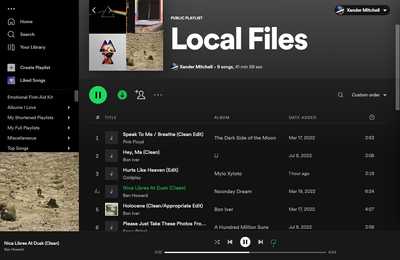
On my laptop, it kind of works - most artwork doesn't show up in the list view (which is another issue that is really annoying me), but does show up when I click on it. However, on my phone...

What makes this even weirder is that not every song has this issue - most of them do, but not all. The same one that shows up in list view also works in Spotify (sometimes... local files are annoying sometimes).
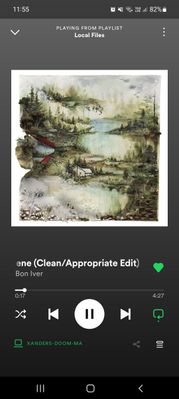
Can someone please help me and save my sanity? I don't know what's going on and it's driving me mental.
Solved! Go to Solution.
- Subscribe to RSS Feed
- Mark Topic as New
- Mark Topic as Read
- Float this Topic for Current User
- Bookmark
- Subscribe
- Printer Friendly Page
Accepted Solutions


- Mark as New
- Bookmark
- Subscribe
- Mute
- Subscribe to RSS Feed
- Permalink
- Report Inappropriate Content
Hi @Desmay2!
Could you let us know what file extension your tracks are using? Are they all .mp3s or do you have .flacs or .wavs as well? It's worth editing the tracks' metadata with another software to see if there's any difference.
Keep us posted on this.
- Mark as New
- Bookmark
- Subscribe
- Mute
- Subscribe to RSS Feed
- Permalink
- Report Inappropriate Content
Hi @Desmay2!
Could you let us know what file extension your tracks are using? Are they all .mp3s or do you have .flacs or .wavs as well? It's worth editing the tracks' metadata with another software to see if there's any difference.
Keep us posted on this.
- Mark as New
- Bookmark
- Subscribe
- Mute
- Subscribe to RSS Feed
- Permalink
- Report Inappropriate Content
Thanks for your quick response! Sorry I didn't see this until now... all the files are MP3s. I'll try to find another program and edit the metadata that way.
- Mark as New
- Bookmark
- Subscribe
- Mute
- Subscribe to RSS Feed
- Permalink
- Report Inappropriate Content
Thank you very much for your help! I tried with a new clean edit and edited it in mp3tag, and it worked perfectly. For the other edits I have to undownload them and remove them from all playlists, remove them from local files, reedit them in mp3tag, and add them back in. While it's a bit of a long process, it seems to do the trick. Thank you! 🙂

- Mark as New
- Bookmark
- Subscribe
- Mute
- Subscribe to RSS Feed
- Permalink
- Report Inappropriate Content
Hey @Desmay2,
Thank you for your reply and confirmation.
We're glad to hear that it works perfectly for you now!
If you ever have any other questions in the future, feel free to post in the Community again 🙂

Suggested posts

Hey there you, Yeah, you! 😁 Welcome - we're glad you joined the Spotify Community! While you here, let's have a fun game and get…
